Questions
25
multiple choice
To pass
20
correct answers (80%)
Time limit
None
per the exam page
Cost
₱0
on the LTMS portal
Language
EN / FIL
English or Filipino
You need
LTMS
account and login
The LTO portal exam is the CDE Online Validation Exam, a 25-question test you take on the LTMS portal before renewing your driver's license. Pass it with 20 correct answers and the portal gives you a CDE certificate for your renewal. It's free, it has no timer, and you can retake it if you fail.
CDE stands for Comprehensive Driver's Education, the refresher course the LTO requires under Republic Act 10930. The course and the exam both live under E-Learning → Driver's License Renewal Course. If you just want the clicks, skip to the 7 steps.
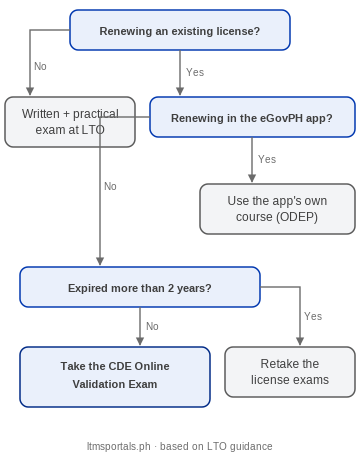
Do you need the CDE, or a different exam?
If you're renewing through the LTMS portal or at an LTO office, you need the CDE. If you're getting your first license, you need a different exam: the written and practical tests at the LTO.
People search "LTO exam" for very different jobs. Taking the wrong test costs you an afternoon, and with luck it doesn't also cost you a wasted trip to the LTO.
The LTO started requiring the CDE certificate for renewals on 28 October 2021, the same period it began issuing 10-year licenses under RA 10930. So it's a renewal thing.
The checker below sorts it out in four taps:
CDE Need Checker
Runs in your browser. Nothing you pick is sent anywhere.
Here are the four LTO tests people mix up most, side by side:
| Item | CDE Online Validation Exam | eGovPH renewal course | Written exam for a new license | CDE at an LTO DEC |
|---|---|---|---|---|
| Who it's for | Renewing through LTMS and an LTO office | Renewing completely inside the eGovPH app | Student permit holders getting their first non-pro or pro license | Renewing, if you'd rather do it face to face |
| Where | portal.lto.gov.ph → E-Learning | eGovPH app → NGAs → LTO → Online Driver's Application | LTO licensing office | Driver's Education Centers in select LTO offices |
| Cost | Free | Part of the app's renewal flow | Part of your license application | Free |
| What you get | CDE certificate | Completion inside the app (ODEP at launch, July 2025) | A pass to proceed to the practical test | CDE certificate |
One exam, a lot of names
LTMS portal exam, LTO exam portal, LTO portal renewal exam, CDE exam, "yung exam sa LTMS": it's all the same 25-item test. LTMS (Land Transportation Management System) is the system behind portal.lto.gov.ph, which is why people say "LTO portal" and "LTMS portal" for the same site. The official name on screen is CDE Online Validation Exam. Search for that if a guide is confusing you.
Have these ready before you open the exam
You need a working LTMS account, the email or Client Number you log in with, and a phone or laptop with steady data.
Five minutes of setup now saves a lot of grief later.
- Your LTMS login. No account yet, or locked out? Set up or open your LTMS account first. The LTO has been clear that you can't take the CDE without registering on the portal.
- One account, and only one. The certificate is tied to the account you pass on. If you made a second account in 2021 and forgot about it, choose one now and stick with it. Passing on the "wrong" account turns into a long conversation at the renewal counter.
- A device with steady data. A laptop makes the course slides easier to read, and a phone is fine for the exam itself.
- Some review time. The LTO describes the full course as roughly five hours of videos and slides. You don't need all of it, as the study plan below explains.
Can't remember your password? Reset your LTMS password before you start, not on question 14.
Where to find E-Learning in the LTMS portal
The exam is under E-LEARNING → Driver's License Renewal Course. It's not on the dashboard tiles. On a phone, E-Learning is the graduation-cap icon.
How do I get into the LTO portal? Go to portal.lto.gov.ph and log in with your email or Client Number and password. Type the address yourself rather than tapping a link from a Facebook comment. Lookalike sites exist.
On a laptop or desktop
- Log in at portal.lto.gov.ph.
- Click E-LEARNING on the top navigation bar.
- Choose Driver's License Renewal Course.
On a phone
The mobile layout hides the top menu. Look for the graduation-cap icon on your dashboard instead. That's E-Learning on the LTMS portal.
Inside the Driver's License Renewal Course is a sidebar with the audio-visual course (videos), the same course as presentation material (slides), and the CDE Online Validation Exam itself.
The portal lists other learning resources beside the renewal course. Here's how much each one helps with the CDE:
| Resource on the portal | What it's for | Useful for the CDE? |
|---|---|---|
| CDE Online Validation Exam | The 25-item test itself | This is the one |
| Driver's License Renewal Course | The videos and slides the exam is built on | Yes, start here |
| Driver's Manual | LTO's reference on road rules and signs | Yes, for signs and right of way |
| Driving Fundamentals | Vehicle handling basics | Light review |
| Getting Ready to Drive | Aimed at new drivers | Not really |
| Licensing Information | License types and processes | Background only |
| LTO Client ID Tutorial | Finding and using your Client ID | Only if login is the problem |
How to take the LTO portal exam (7 steps)
Log in to LTMS, open E-Learning, choose Driver's License Renewal Course, then CDE Online Validation Exam. Click Start Exam, pick English or Filipino, and answer all 25. Score 20 or more, then print and save your certificate.
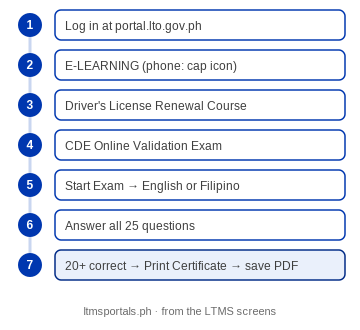
- Log in at portal.lto.gov.ph with your email or Client Number.
- Open E-Learning. Use the top menu on a computer, or the cap icon on a phone.
- Click Driver's License Renewal Course and review the videos or slides.
- Click CDE Online Validation Exam in the sidebar, read the reminder, then click the link to start.
- Click Start Exam and choose English or Filipino.
- Answer all 25 questions. Nothing is counting down.
- Check your score. If it's 20 or higher, click Print Certificate and save the PDF.
Open the CDE exam on portal.lto.gov.ph ↗
Here's what to expect at each step, and where people usually stumble.
Step 4: The reminder page
Before the exam starts, LTMS shows a short reminder: use the exam for your driver's license renewal application, the passing score is 80% (at least 20 correct answers out of 25), and there's no time limit. If a blog says otherwise, believe the screen.
Step 5: Start Exam and language
Choose the language you read fastest, not the one that feels more official. Plenty of questions describe a road situation and ask what you'd do, so reading speed matters more than vocabulary. If you think in Taglish anyway, Filipino is usually the quicker read.
Step 6: The questions
Expect one multiple-choice question per screen. Two habits help:
- Don't use the Back button or refresh mid-exam. Government portals and browser refreshes are not friends.
- Read every choice before you tap. The wrong answers are usually things you've watched other drivers do on the road this week. That's why they feel right.
Step 7: Your score
Your result appears after the last question. If you passed, don't close the tab. Go straight to saving your certificate.
Would you rather watch it?
This walkthrough follows the same menu path. The portal's look has shifted a little since it was recorded, but the clicks are the same.
Prefer Tagalog? PAANO MAG-EXAM NG CDE SA LTO PORTAL ONLINE? ↗ walks through the same steps on an older version of the portal.
What the 25 questions cover
The questions come from the LTO's Driver's License Renewal Course: road signs and markings, traffic rules and right of way, and the special laws on motorcycles, tricycles and motor vehicles.
The course is the syllabus. Good news: no guessing what's in scope.
The LTO's video course is split by license type, with one set for non-professional holders and one for professional holders. Each set has a two-part general information section, a section on special laws for motorcycles and tricycles, and one on special laws for motor vehicles.
In practice, expect three kinds of questions:
- Signs and markings. Think of the yellow box junctions on EDSA, or the less common warning signs you see once a year on a provincial highway. Long-time drivers drop points here more than anywhere else.
- "What should you do" situations. Right of way at intersections, overtaking, pedestrians, emergency vehicles.
- Special laws. Seatbelts (RA 8750), child car seats (RA 11229), motorcycle helmets (RA 10054), distracted driving (RA 10913) and drunk or drugged driving (RA 10586).
A study plan for the time you actually have
Only 30 minutes? Open the Driver's Manual and go through the road signs. Then open the slides for the special laws that match your vehicle: motorcycle laws if you ride, motor vehicle laws if you drive a car. That's where the easy points hide.
Got two hours? Go through the presentation material (slides) from start to finish, then do the exam. Honestly, we'd pick the slides over the videos for most people. You can skim what you already know and slow down on what you don't. The videos make more sense if you learn by listening, or if you're watching with a parent.
About the "answer keys" online
"Where can I find the answers to the LTO online exam renewal?" is one of the most searched questions about this test. Here's the honest answer:
- The LTO doesn't publish an official answer key.
- Keys copied from someone else's attempt may not match the questions you get. Many were made when the passing mark was lower.
- Memorizing "A, C, B, D…" is useless the moment the order or wording changes.
Reviewers that explain answers are worth your time. Lists of letters aren't. And the most accurate key you'll find is your own: after each attempt, the portal shows you which answers you got wrong.
Why some sites still say 13 out of 25
The passing mark used to be 50% (13 of 25). The LTMS exam page now says 80%, which is at least 20 correct answers.
When the CDE rolled out in late 2021, news reports and an early LTO step-by-step guide gave the passing mark as 13 correct answers. Plenty of reviewers, vlogs and Facebook posts never updated.
The CDE Online Validation Exam page on portal.lto.gov.ph is what counts, and it says 20. So if your barkada swears 13 is enough, smile and aim for 20. Better yet, aim for 23 and give yourself a cushion.
If you score below 20
Retake it. The LTO has said applicants can retake the CDE until they pass, and the exam page shows no attempt limit or waiting period.
Before you click retake, spend five minutes on this:
- Click Show Your Answers on the result page and see which questions you missed.
- Look for a pattern. Mostly signs? Mostly motorcycle laws?
- Reopen just that part of the Driver's License Renewal Course, not all five hours.
- Retake.
Don't hand your login to a "helper" who offers to take it for you for a fee. They'd walk away with your account, your personal details and your Client ID, all to save you from a free exam you can retake as many times as you like. That's a bad trade.
Helping a parent or lolo take the exam
You can sit beside them, set things up and read the questions aloud. The answers should be theirs.
A lot of LTMS exams are taken by a son or daughter for a parent who has driven for 30 years and has never once clicked "Start Exam." That's fine, and it's often the only way it gets done.
What actually helps:
- Use a laptop if you have one, and zoom in with Ctrl and + (or Cmd and + on a Mac). Small text on a phone is where frustration starts.
- Switch to Filipino if that's how they think. Situation questions are much easier in the language they actually use behind the wheel.
- Watch the course videos together the night before, rather than reading slides at them.
- Read each question aloud, then let them choose.
Where to draw the line: answering for them. The certificate is supposed to show they know current road rules. Back in 2022, LTO officials raised exactly this concern, other people answering the exam for the license holder, when they talked about adding facial recognition to the portal. Besides, they're the one driving home from the province, not you.
Download, save and print your CDE certificate
After passing, click Print Certificate on the result page, save it as a PDF, and back it up. That PDF is what you'll use for your license renewal.
This is the step people rush and then regret at the LTO counter.
- On the result page, click Print Certificate. The certificate opens on screen.
- Check your details. Your name should match your license card exactly. If something's off, fix your LTMS profile before your renewal, not at the window.
- Save it as a PDF: - Computer: choose Print, then pick "Save as PDF" as the printer. - Android Chrome: ⋮ → Share → Print → Save as PDF. - iPhone Safari: Share → Print, pinch out on the preview, then Share → Save to Files.
- Back it up. Email it to yourself or put it in Google Drive. Your phone's Downloads folder is not a filing cabinet.
- Print one copy if you're renewing at an LTO office, in case the counter asks for paper.
Nothing opens when you click Print Certificate? Your browser probably blocked a pop-up. Look for the small blocked-window icon in the address bar, allow pop-ups for portal.lto.gov.ph, and click again.
Lost the PDF later? Log back in and check the exam page for your passed result before assuming you have to retake. But don't bank on that. Save the file the moment you pass.
How long is the CDE certificate valid?
The LTO has announced that the CDE certificate of completion doesn't expire, so you can take the exam well before your renewal. Our suggestion: do it within the same month anyway. It's easier to find a file from three weeks ago than from three years ago.
When the exam or certificate won't load
Most problems come down to the wrong menu, a blocked pop-up, or the portal being busy. Try the fix for your symptom below before you retake anything.
The portal won't open at all
Try another browser, or switch between mobile data and Wi-Fi. If it won't load anywhere, the problem is likely on LTO's side. Step away for an hour instead of hammering refresh, and try outside office hours.
You can't find the exam link
You're probably looking at the dashboard tiles. It's under E-LEARNING → Driver's License Renewal Course, or the cap icon on mobile. If the menu won't show on your phone, rotate the screen or turn on your browser's desktop view.
You can't log in
Check the address bar says portal.lto.gov.ph. Then recover your LTMS account. If an email you're sure about keeps failing, you may have registered with a different one back in the day. Try your Client Number.
Stuck after the last question
Give it 30 seconds. If it still hangs, open E-Learning in a new tab (leave the stuck one alone) and look for a result on the exam page. If there isn't one, take it again. It's annoying, but it's free.
The certificate page is blank
Allow pop-ups for portal.lto.gov.ph, then try a different browser. On a phone, use the Save as PDF steps above instead of the print dialog.
Logged out partway through
Long idle stretches, usually while you're reviewing the course, can end your session. Log back in and restart the exam. With no timer, all you lose is that attempt's progress.
Take it at home, at an LTO DEC, or at a driving school?
Take it at home on LTMS unless you need someone beside you. It's the same LTO exam everywhere. Only the setting and the cost change.
| Item | At home on LTMS | LTO Driver's Education Center (DEC) | LTO-accredited driving school |
|---|---|---|---|
| Suits | Anyone with a phone or laptop and an LTMS login | Drivers who want face-to-face review, or don't have a device | Drivers who want a guided seminar plus help with the portal |
| Doesn't suit | First-time online users with nobody to ask | Anyone short on time (travel and queues) | Anyone on a tight budget |
| Cost | Free | Free | The school sets its own seminar fee. Ask first. |
| Who runs the exam | LTO, via LTMS | LTO | LTO, via LTMS. The school only hosts. |
| Result | CDE certificate in your account | CDE certificate | CDE certificate in your account |
Our pick is home, for almost everyone. A DEC makes sense if you want a real person walking you through it. Paying a driving school only makes sense if you also want help with the driving itself. Paying ₱500 or more just so someone can click "Start Exam" beside you is money better spent on the medical exam.
One firm rule: the LTO has said only the LTO administers the CDE exam. Schools can run review seminars and give you a seat at a computer, but they can't issue a certificate on their own. Anyone selling a CDE certificate without the exam is selling a fake, and the LTO has warned the public against exactly that. A fake certificate won't save you a trip. It'll cost you one.
Quick answers
Is the LTO portal exam free?
Yes. The course and the CDE Online Validation Exam cost nothing on the LTMS portal.
How many times can I retake it?
As many as you need. The LTO has said you can retake it until you pass.
Can I take the LTMS portal exam on my phone?
Yes. On a phone, E-Learning is the graduation-cap icon on your dashboard.
Does the CDE certificate expire?
The LTO has announced it doesn't. Keep the PDF safe anyway, because losing it is the bigger risk.
Is there a time limit?
No. The exam page says there's no time limit to answer the questions.
Do I need the CDE if I renew through eGovPH?
When eGovPH renewal launched in July 2025, the app used its own course (ODEP) instead. Follow the app's prompts. For renewals through LTMS or an LTO office, take the CDE.
You passed. Here's the rest of your renewal
The CDE certificate is one requirement down. For an ordinary renewal, you'll also need a medical certificate from an LTO-accredited clinic, and you'll need to settle any unsettled violations. From here:
- Pick your route and check the fees: renewing your driver's license through LTMS, eGovPH or the LTO office
Keep the PDF somewhere you can open it offline within five seconds. Mobile signal inside some LTO offices is about as reliable as the queue estimate.
Sources
- LTO LTMS Portal: CDE Online Validation Exam ↗ (25 items, 80% or 20 correct, no time limit)
- Republic Act No. 10930 ↗, Official Gazette
- Inquirer: Drivers now required to take driver's education upon license renewal – LTO ↗ (CDE start, 28 Oct 2021)
- PTV/PNA: LTO reiterates no refresher course exemptions ↗ (original 13-of-25 mark)
- Carmudi: Majority of renewals used the online portal ↗ (only LTO administers the exam; schools host)
- AutoIndustriya: CDE certificate has no expiration ↗
- Top Gear PH: Renewing through the eGovPH app ↗ (ODEP, July 2025)
- Top Gear PH: LTO CDE review videos ↗ (course structure by license type)
- Top Gear PH: LTO weighs changes to the online renewal exam ↗ (2022 facial-recognition remarks)